
How to Get Accurate Verbatim Coding When AI Is in the Workflow
By BT Insights
- article
- Advanced Statistical Techniques
- Agile Quantitative Research
- Artificial Intelligence
- Data Analytics
- AI
- Survey Research
- DIY Surveys
- Coding/Data Entry
- Verbatim Response Coding
Summarise with AI




Coding open-ended responses has typically been one of the slowest parts of survey research.
AI has now changed that, with the ability to code thousands of verbatims in minutes instead of days. The thing is, speed only matters if the codes are right. And AI can definitely get it wrong.
According to Greenbook’s 2025 GRIT report, data quality concerns rose 40% year over year, driven partly by synthetic and AI-generated respondents. Faster coding of unreliable inputs just produces unreliable results faster.
At BTInsights, we work with research teams coding open-ends across trackers and one-off studies. When they tell us AI verbatim coding “didn’t work,” the model is rarely the root cause. More often, the AI was missing context, working from an unclear instruction, or trying to do three jobs at once. Those are all things researchers can control.
These are the setup choices we’ve seen make the biggest difference in accuracy, in roughly the order you’d make them on a project.
Start With Context
A human coder never works blind. They know who commissioned the study, what it’s trying to learn, and exactly how each question was asked.
AI deserves the same briefing. And it needs it, because if there’s anything that AI is missing, it’s context.
Include the project-related context
A description of the study goes a long way (as detailed as you can make it): the category, the audience, the business question behind it, and anything else that provides useful context. Knowing that a study is about a grocery delivery app, for example, helps the AI read “it’s always late” as a delivery-timing issue rather than a vague complaint.
Include the full question text
This is the one teams skip most often. Instead of labelling a column Q1 or Q7, give the AI the actual question. It matters because the right code list depends on how the question was asked. Consider two versions of what looks like the same question:
- “What do you like most about this product?”
- “What, if anything, would make you stop using this product?”
A response like “the price” means something completely different when applied to the context of each individual question. Without the question text, the AI has to guess which frame it’s working in.
Be Explicit About the Coding Method
Once the AI understands the question, it needs to know what kind of coding you want. There are two decisions that come up on nearly every project. Together, they add the specificity necessary to ensure quality.
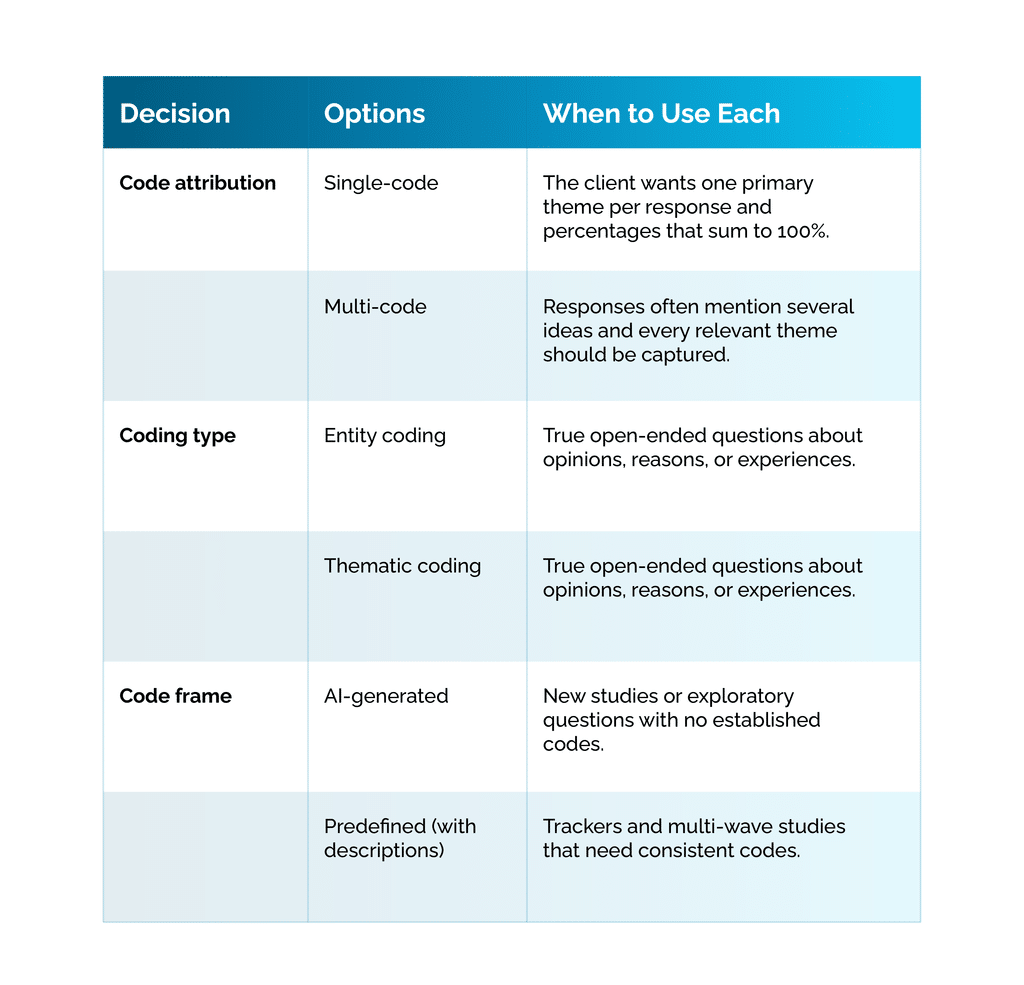
Single-code or multi-code attribution
Some clients want exactly one code per response, usually the primary theme. Others want every relevant code applied, so a response like “cheaper than the others and the app is easy to use” gets tagged for both price and ease of use.
Both choices have their merit, but the choice has to be stated clearly as the output, and the resulting percentages will differ. Multi-code results won’t sum to 100%, and single-code results will undercount secondary themes by design.
Entity coding or thematic coding
Not every open-ended question calls for themes.
Questions like “What is your favourite brand?” or “Which stores do you shop at most?” are entity questions. The goal is to extract the specific names mentioned, standardising spelling and variations along the way. You don’t want the AI summarising those responses into qualitative themes like “prefers premium brands”. Do that, and some of your most valuable data is lost in translation.
For true open-ended questions, thematic coding is the right approach. Just make sure the AI knows which one it’s doing on each question. You can use this table to help guide your decision:
Write Code Descriptions for Your Code Frame
Plenty of projects start with a predefined code frame. Tracking studies are the obvious example, since codes need to stay consistent from wave to wave so results can be compared.
However, a code label alone often isn’t enough in those cases. A code like “Value” or “Quality” can mean very different things to different people, and by extension to an AI.
Adding a short description or custom instruction to each code dramatically improves accuracy, especially for high-level codes. For example:
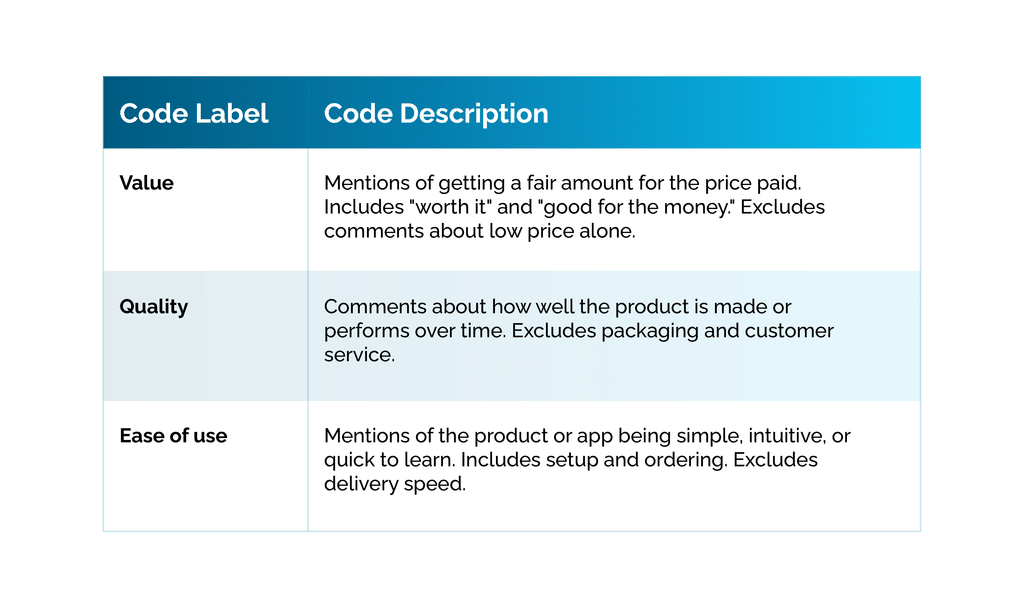
Keep in mind that you don’t need a paragraph per code. One or two sentences defining what’s included (and ideally what isn’t) usually does the job. Prioritise the broad codes first, since those are where most disagreements between coders happen, whether human or AI.
Prepare Your Data Before Coding
It’s tempting to hand the AI a full dataset and add instructions like “only code responses from women” or “combine Q5a through Q5e”. And the AI can often do it. But every extra task spends reasoning effort and adds room for distraction, and that effort comes straight out of coding quality. The more focused the job, the better the results.
Code segments from their own column
If you only want to code one segment, say the female respondents for a particular question, create a column that contains only those responses. Then, have the AI code that column.
Don’t ask the AI to identify the segment and code it in the same step. You already know who belongs in the segment, so let the data prep handle it.
Merge multi-response questions cleanly
Multiple-response open-ends often arrive split across several columns, one per response. If you want to code them together, combine them into one clean column first and then code that single column.
You’re probably noticing a pattern, and it’s an important one. Start with the structural work in your data prep, then give the AI one clear coding task.
Screen Out AI-Generated Responses
A growing share of open-ended answers in online surveys aren’t fully human. In one study of online research participants, 34% reported using LLMs to help answer open-ended questions, and those AI-assisted responses tended to be more uniform and more positive than human ones.
That’s a real problem for coding, as it can warp the data. AI-written responses can inflate certain themes, flatten differences between groups, and make a population look more satisfied than it is.
Ideally, you’ll have a tool that helps detect AI-generated responses so you can review or remove them before coding starts. At absolute minimum, watch for clusters of unusually polished, similar-sounding answers.
Keep Researchers in the Loop
Even with a strong setup, AI coding works best as a first pass that researchers review. This might seem like an obvious step, as AI still needs quite a bit of guidance. But it’s easy to overlook this step out of a desire to want to fully automate the process.
Plan time to check a sample of coded responses, especially for small or ambiguous codes. Merge codes that overlap, split codes that are too broad, and reassign responses that landed in the wrong place. Each of those edits makes the final data more accurate, and for trackers, it improves the code frame for the next wave too.
What Accurate AI Coding Depends On
The setup steps above take a little extra time at the start of a project. In return, they save hours of recoding, keep trackers consistent from wave to wave, and give you numbers you can stand behind when a client asks how a theme was defined. As more responses pass through AI, and more respondents use it themselves, that setup work is where coding accuracy is won.
It’s also the approach behind our Survey Open-Ends Coding platform, where you can bring your own code frame or generate one, then review, merge, and split codes before anything is final. Because researchers review every code assignment against the original verbatims, the setup decisions above can be checked and corrected before results reach a client, and a refined code frame carries forward into the next tracker wave.
Whatever platform you use, the principle holds: AI verbatim coding is only as accurate as the context and structure researchers give it.